
OTP Push: Easy Transfer of OTP Codes from Mobile to Browser

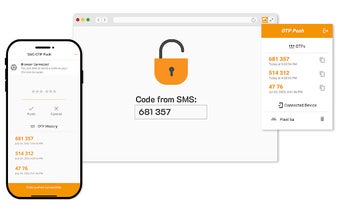
The OTP Push is a Chrome extension developed by alexei.volosozhar that simplifies the process of transferring one-time password (OTP) codes from your mobile device to your desktop browser. With the increasing use of phone numbers for two-factor authentication, many services rely on sending OTP codes via SMS. However, the traditional method of manually copying and pasting the code from the message to the input field can be cumbersome.

The OTP Push streamlines this process by allowing users to receive the OTP code on their mobile device and effortlessly transfer it to their connected desktop Chrome browser. To get started, simply install the mobile app and Chrome extension from the official app stores. Then, use the mobile app to scan the browser extension's QR code and establish a connection between your phone and your desktop Chrome browser. Once connected, you can easily push the OTP code from the SMS to the connected browser.

This handy tool is compatible with a wide range of services that support SMS-based two-factor authentication. Say goodbye to the hassle of manually inputting OTP codes and streamline your authentication process with OTP Push.

 0/1

App specs

  • License

    Free

  • Version

    1.1.7

  • Latest update

  • Platform

    chrome

  • Downloads

    63

  • Developer

Program available in other languages


User reviews about OTP Push

Have you tried OTP Push? Be the first to leave your opinion!

Add review

Top extensions for Google Chrome

Top downloads Add-ons & Tools for Google Chrome

Top downloads Add-ons & Tools for Google Chrome

Top downloads Add-ons & Tools for Google Chrome

Related topics about OTP Push

You may also like

Explore Apps

Latest articles

Laws concerning the use of this software vary from country to country. We do not encourage or condone the use of this program if it is in violation of these laws.
Softonic

Is OTP Push safe?

100/100

Score result: Clean

This file passed a comprehensive security scan using VirusTotal technology. It is safe to download.

  • Virus free
  • Spyware free
  • Malware free
  • Verified by Security Partners

    VirusTotal logo

Scan Info

Last scan
Wednesday, March 19, 2025
Scan provider
VirusTotal

Softonic security commitment

OTP Push has been thoroughly scanned by our advanced security systems and verified by industry-leading partners. This file comes from the official developer and has passed all our security checks, showing no signs of viruses, malware, or spyware. For more information, visit our Security and Trust Center